← BackPersonal Project · 2025
Design-to-Code, an AI-Powered Personal Product Experiment
RaceView is a personal product design and prototyping project built for Formula 1 fans who want a clean, fast way to follow the current season. Designed in Figma and translated into a working React prototype packaged as an installable Android APK using Capacitor, demonstrating a full design-to-code workflow powered by modern tooling.
Personal ProjectMobile UXClaudeCodeReactCapacitorDesign-to-CodeAI-Powered Design
Background
Why I built this
Formula 1 information is everywhere, but the experience of accessing it is often painful. Official apps push subscriptions. Third-party apps pile on ads and sign-up walls. I wanted to explore what a focused, zero-friction sports companion could look like if it answered only the most essential questions — nothing more, nothing less.
The project was also a deliberate test of a modern design-to-code workflow: could I go from Figma screens to a real, installable Android app without a dedicated engineering team?
The app answers three core questions
What races are coming up?
What happened in the latest race?
Where do drivers currently stand in the championship?
Design Goals
Four guiding principles
Fast Access
Open the app and immediately understand the season context. No loading screens, no onboarding, no barriers to content.
Minimal Friction
No account creation, no subscription barrier, no unnecessary navigation. Three screens, one tab bar, live data.
Clear Hierarchy
Race status, podium results, and championship positions must be instantly scannable. Visual weight does the sorting work.
Design-to-Code Fidelity
The final Android prototype should faithfully preserve the visual direction, spacing, typography, and component behaviour defined in Figma.
Core Experience
Three screens, one purpose
Navigation is handled through a fixed bottom tab bar. Home gives the season at a glance, Schedule surfaces the full calendar with embedded results, and Standings tracks the championship in real time.
01
Home
The home screen delivers immediate season context the moment the app opens: next race info, current championship leader, and a quick-access card for the latest result. No login, no loading state, no friction.
02
Schedule & Results
The schedule screen opens with a horizontal slider of past race results, letting fans quickly scroll through recent rounds without leaving the view. Below that, upcoming races are listed with the race name, circuit, and date, each tagged to make the next events immediately scannable.
03
Standings
The standings screen opens on the driver championship table, with the top three given stronger visual treatment and compact rows for the rest of the grid. Swiping left or using the segment controller switches to constructor standings, listing each team with their current position and points total. Both views update live from the Jolpica API on every app load.
04
Detailed Screens
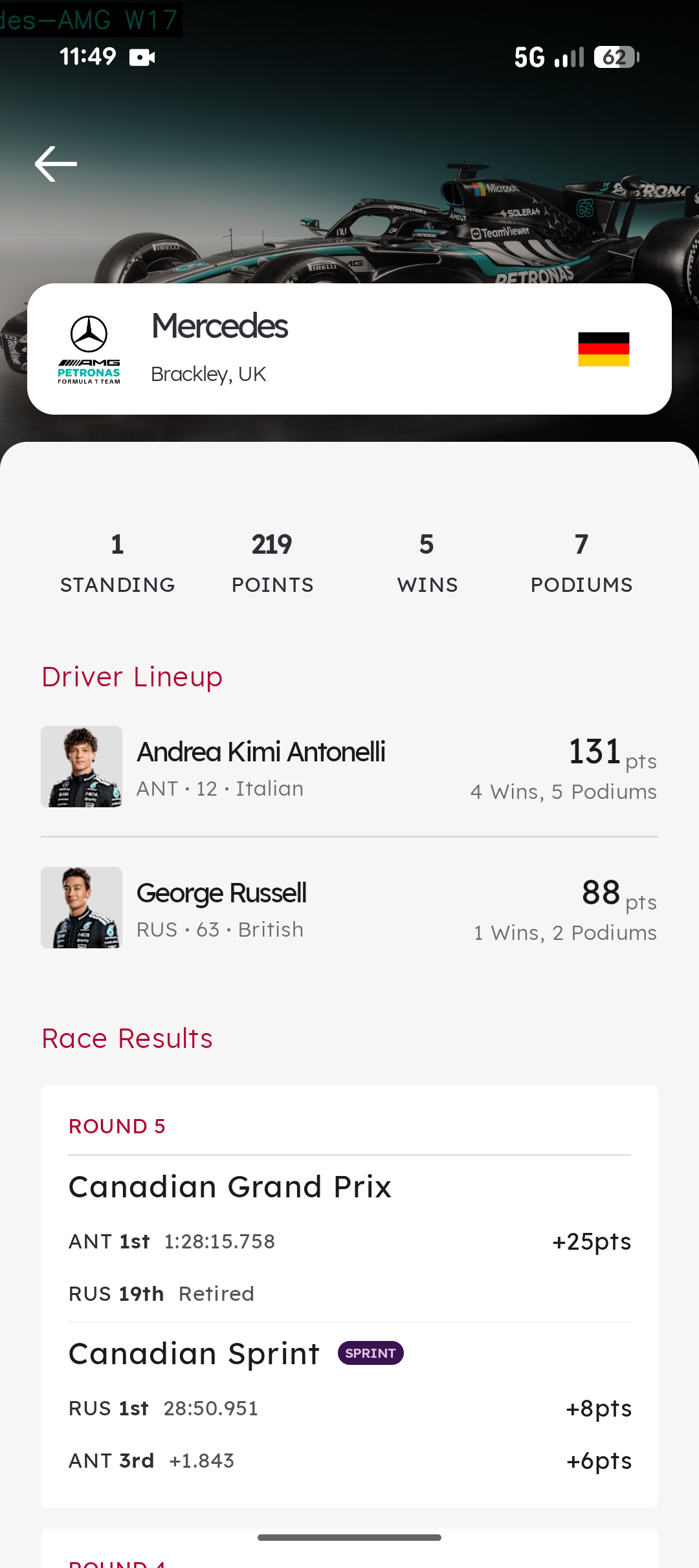
Driver detail and team overview screens provide deeper context for fans who want to go beyond the headline numbers: race-by-race performance, constructor standings, and key session data, all within the same zero-auth experience.
Visual Design
Visual design direction
The visual system was intentionally restrained to keep the app fast, focused, and content-led. The interface uses a mostly monochrome palette with F1 red as the primary accent, creating a strong connection to the sport without overwhelming the UI.
Monochrome UI foundation with F1 red as the main accentLexend typeface for strong readability on mobile displaysCard-based layouts for race, result, and standings informationCompact spacing and clear hierarchy for quick scanningStatus badges to distinguish completed and upcoming racesMinimal shadow usage with subtle borders for structure and depth
Process
Design-to-code workflow
This project was intentionally built as a design-led prototype. Instead of stopping at static screens, I translated the Figma design into a working React implementation. Design tokens (colour, typography, spacing, radius, and border treatment) were defined up front and carried directly into the coded interface. This helped preserve visual consistency and reduced the gap between design intent and development output. The Figma-first workflow allowed me to validate both the interface and the implementation approach at the same time.
Technical Approach
How it was built
RaceView was built using React 18 and Vite, then wrapped into a native Android app using Capacitor. Live F1 season data is pulled from the Jolpica F1 API, which provides schedule, race results, and driver standings without requiring authentication. The prototype validates a lightweight app architecture that avoids the need for a backend, paid API subscription, or Play Store distribution during the development phase.
Key Decisions
Decisions & trade-offs
React + Capacitor
Chosen to move quickly from design to working Android prototype using familiar web tooling. The trade-off is that the app runs in a WebView rather than being fully native, which is acceptable for a prototype at this stage.
Jolpica F1 API
Enabled live season data with no authentication or cost. The trade-off is that the app is not suitable for real-time race timing, as interval data is outside the scope of this API.
Outcomes
What was delivered
APK
Installable Android prototype
1:1
Figma-to-code fidelity
Reflection
What this demonstrates
RaceView showcases my ability to move beyond static design into product thinking and functional prototyping. It demonstrates how I approach a personal product idea, from problem framing through UX structure, visual design, technical implementation, and future iteration planning, and how a modern design-to-code workflow can close the gap between design intent and shipped product.
Next steps
01
A token-first approach is the single most effective way to maintain design fidelity as a design moves into code
02
Feature restraint is a design decision. Scoping to three screens made the experience coherent and the build achievable
03
Capacitor is a credible path from web prototype to installable Android app without native development overhead
04
Personal projects are one of the best ways to test tooling, workflow, and product thinking without client constraints